 3b6e281de5
- Replace lru crate with moka 0.12.11 for superior concurrent performance
- Implement lock-free cache with automatic TTL/TTI expiration
- Add size-based eviction using Moka's weigher function
- Integrate comprehensive metrics collection throughout GetObject flow:
  * Cache hit/miss tracking with per-key access counts
  * Request concurrency gauges
  * Disk permit wait time histograms
  * Total request duration tracking
  * Response size and buffer size histograms
- Deep integration with ecfs.rs GetObject operation
- Add hit rate calculation method
- Enhanced CacheStats with hit/miss counters
- Lock-free concurrent reads for better scalability

Moka advantages over LRU:
- True lock-free concurrent access
- Built-in TTL and TTI support
- Automatic size-based eviction
- Better performance under high concurrency
- Native async support

Co-authored-by: houseme <4829346+houseme@users.noreply.github.com>

RustFS is a high-performance, distributed object storage system built in Rust.


Getting Started · Docs · Bug reports · Discussions
English | 简体中文 | Deutsch | Español | français | 日本語 | 한국어 | Portuguese | Русский
RustFS is a high-performance, distributed object storage system built in Rust., one of the most popular languages worldwide. RustFS combines the simplicity of MinIO with the memory safety and performance of Rust., S3 compatibility, open-source nature, support for data lakes, AI, and big data. Furthermore, it has a better and more user-friendly open-source license in comparison to other storage systems, being constructed under the Apache license. As Rust serves as its foundation, RustFS provides faster speed and safer distributed features for high-performance object storage.
⚠️ Current Status: Beta / Technical Preview. Not yet recommended for critical production workloads.
Features
- High Performance: Built with Rust, ensuring speed and efficiency.
- Distributed Architecture: Scalable and fault-tolerant design for large-scale deployments.
- S3 Compatibility: Seamless integration with existing S3-compatible applications.
- Data Lake Support: Optimized for big data and AI workloads.
- Open Source: Licensed under Apache 2.0, encouraging community contributions and transparency.
- User-Friendly: Designed with simplicity in mind, making it easy to deploy and manage.
RustFS vs MinIO
Stress test server parameters
| Type | parameter | Remark |
|---|---|---|
| CPU | 2 Core | Intel Xeon(Sapphire Rapids) Platinum 8475B , 2.7/3.2 GHz |
| Memory | 4GB | |
| Network | 15Gbp | |
| Driver | 40GB x 4 | IOPS 3800 / Driver |
https://github.com/user-attachments/assets/2e4979b5-260c-4f2c-ac12-c87fd558072a
RustFS vs Other object storage
| RustFS | Other object storage |
|---|---|
| Powerful Console | Simple and useless Console |
| Developed based on Rust language, memory is safer | Developed in Go or C, with potential issues like memory GC/leaks |
| No telemetry. Guards against unauthorized cross-border data egress, ensuring full compliance with global regulations including GDPR (EU/UK), CCPA (US), APPI (Japan) | Potential legal exposure and data telemetry risks |
| Permissive Apache 2.0 License | AGPL V3 License and other License, polluted open source and License traps, infringement of intellectual property rights |
| 100% S3 compatible—works with any cloud provider, anywhere | Full support for S3, but no local cloud vendor support |
| Rust-based development, strong support for secure and innovative devices | Poor support for edge gateways and secure innovative devices |
| Stable commercial prices, free community support | High pricing, with costs up to $250,000 for 1PiB |
| No risk | Intellectual property risks and risks of prohibited uses |
Quickstart
To get started with RustFS, follow these steps:
- One-click installation script (Option 1)
curl -O https://rustfs.com/install_rustfs.sh && bash install_rustfs.sh
- Docker Quick Start (Option 2)
RustFS container run as non-root user rustfs with id 1000, if you run docker with -v to mount host directory into docker container, please make sure the owner of host directory has been changed to 1000, otherwise you will encounter permission denied error.
 # create data and logs directories
 mkdir -p data logs

 # change the owner of those two ditectories
 chown -R 10001:10001 data logs

 # using latest version
 docker run -d -p 9000:9000 -p 9001:9001 -v $(pwd)/data:/data -v $(pwd)/logs:/logs rustfs/rustfs:latest

 # using specific version
 docker run -d -p 9000:9000 -p 9001:9001 -v $(pwd)/data:/data -v $(pwd)/logs:/logs rustfs/rustfs:1.0.0.alpha.68
For docker installation, you can also run the container with docker compose. With the docker-compose.yml file under
root directory, running the command:
docker compose --profile observability up -d
NOTE: You should be better to have a look for docker-compose.yaml file. Because, several services contains in the
file. Grafan,prometheus,jaeger containers will be launched using docker compose file, which is helpful for rustfs
observability. If you want to start redis as well as nginx container, you can specify the corresponding profiles.
-
Build from Source (Option 3) - Advanced Users
For developers who want to build RustFS Docker images from source with multi-architecture support:
# Build multi-architecture images locally
./docker-buildx.sh --build-arg RELEASE=latest

# Build and push to registry
./docker-buildx.sh --push

# Build specific version
./docker-buildx.sh --release v1.0.0 --push

# Build for custom registry
./docker-buildx.sh --registry your-registry.com --namespace yourname --push
The
docker-buildx.shscript supports:- Multi-architecture builds:
linux/amd64,linux/arm64 - Automatic version detection: Uses git tags or commit hashes
- Registry flexibility: Supports Docker Hub, GitHub Container Registry, etc.
- Build optimization: Includes caching and parallel builds
You can also use Make targets for convenience:
make docker-buildx                    # Build locally
make docker-buildx-push               # Build and push
make docker-buildx-version VERSION=v1.0.0  # Build specific version
make help-docker                      # Show all Docker-related commands
Heads-up (macOS cross-compilation): macOS keeps the default
ulimit -nat 256, socargo zigbuildor./build-rustfs.sh --platform ...may fail withProcessFdQuotaExceededwhen targeting Linux. The build script now tries to raise the limit automatically, but if you still see the warning, runulimit -n 4096(or higher) in your shell before building. - Multi-architecture builds:
-
Build with helm chart(Option 4) - Cloud Native environment
Following the instructions on helm chart README to install RustFS on kubernetes cluster.
-
Access the Console: Open your web browser and navigate to
http://localhost:9000to access the RustFS console, default username and password isrustfsadmin. -
Create a Bucket: Use the console to create a new bucket for your objects.
-
Upload Objects: You can upload files directly through the console or use S3-compatible APIs to interact with your RustFS instance.
NOTE: If you want to access RustFS instance with https, you can refer
to TLS configuration docs.
Documentation
For detailed documentation, including configuration options, API references, and advanced usage, please visit our Documentation.
Getting Help
If you have any questions or need assistance, you can:
- Check the FAQ for common issues and solutions.
- Join our GitHub Discussions to ask questions and share your experiences.
- Open an issue on our GitHub Issues page for bug reports or feature requests.
Links
- Documentation - The manual you should read
- Changelog - What we broke and fixed
- GitHub Discussions - Where the community lives
Contact
- Bugs: GitHub Issues
- Business: hello@rustfs.com
- Jobs: jobs@rustfs.com
- General Discussion: GitHub Discussions
- Contributing: CONTRIBUTING.md
Contributors
RustFS is a community-driven project, and we appreciate all contributions. Check out the Contributors page to see the amazing people who have helped make RustFS better.

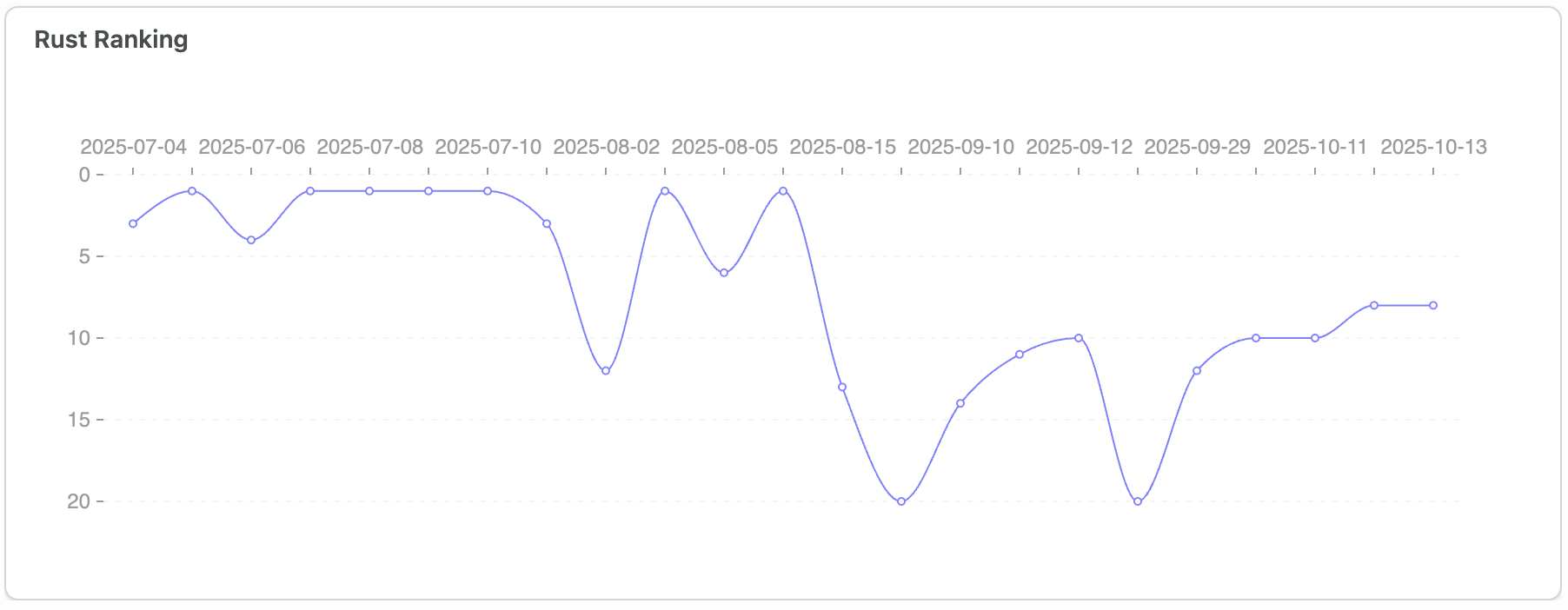
Github Trending Top
🚀 RustFS is beloved by open-source enthusiasts and enterprise users worldwide, often appearing on the GitHub Trending top charts.
Star History
License
RustFS is a trademark of RustFS, Inc. All other trademarks are the property of their respective owners.