mirror of
https://github.com/rustfs/rustfs.git
synced 2026-01-17 01:30:33 +00:00

186 lines
9.3 KiB
Markdown
186 lines
9.3 KiB
Markdown
[](https://rustfs.com)
|
||
|
||
<p align="center">RustFS 是一个使用 Rust 构建的高性能分布式对象存储软件</p >
|
||
|
||
<p align="center">
|
||
<a href="https://github.com/rustfs/rustfs/actions/workflows/ci.yml"><img alt="CI" src="https://github.com/rustfs/rustfs/actions/workflows/ci.yml/badge.svg" /></a>
|
||
<a href="https://github.com/rustfs/rustfs/actions/workflows/docker.yml"><img alt="Build and Push Docker Images" src="https://github.com/rustfs/rustfs/actions/workflows/docker.yml/badge.svg" /></a>
|
||
<img alt="GitHub commit activity" src="https://img.shields.io/github/commit-activity/m/rustfs/rustfs"/>
|
||
<img alt="Github Last Commit" src="https://img.shields.io/github/last-commit/rustfs/rustfs"/>
|
||
<a href="https://hellogithub.com/repository/rustfs/rustfs" target="_blank"><img src="https://abroad.hellogithub.com/v1/widgets/recommend.svg?rid=b95bcb72bdc340b68f16fdf6790b7d5b&claim_uid=MsbvjYeLDKAH457&theme=small" alt="Featured|HelloGitHub" /></a>
|
||
</p >
|
||
|
||
<p align="center">
|
||
<a href="https://docs.rustfs.com/zh/introduction.html">快速开始</a >
|
||
· <a href="https://docs.rustfs.com/zh/">文档</a >
|
||
· <a href="https://github.com/rustfs/rustfs/issues">问题报告</a >
|
||
· <a href="https://github.com/rustfs/rustfs/discussions">讨论</a >
|
||
</p >
|
||
|
||
<p align="center">
|
||
<a href="https://github.com/rustfs/rustfs/blob/main/README.md">English</a > | 简体中文
|
||
</p >
|
||
|
||
RustFS 是一个使用 Rust(全球最受欢迎的编程语言之一)构建的高性能分布式对象存储软件。与 MinIO 一样,它具有简单性、S3
|
||
兼容性、开源特性以及对数据湖、AI 和大数据的支持等一系列优势。此外,与其他存储系统相比,它采用 Apache
|
||
许可证构建,拥有更好、更用户友好的开源许可证。由于以 Rust 为基础,RustFS 为高性能对象存储提供了更快的速度和更安全的分布式功能。
|
||
|
||
## 特性
|
||
|
||
- **高性能**:使用 Rust 构建,确保速度和效率。
|
||
- **分布式架构**:可扩展且容错的设计,适用于大规模部署。
|
||
- **S3 兼容性**:与现有 S3 兼容应用程序无缝集成。
|
||
- **数据湖支持**:针对大数据和 AI 工作负载进行了优化。
|
||
- **开源**:采用 Apache 2.0 许可证,鼓励社区贡献和透明度。
|
||
- **用户友好**:设计简单,易于部署和管理。
|
||
|
||
## RustFS vs MinIO
|
||
|
||
压力测试服务器参数
|
||
|
||
| 类型 | 参数 | 备注 |
|
||
|-----|----------|----------------------------------------------------------|
|
||
| CPU | 2 核心 | Intel Xeon(Sapphire Rapids) Platinum 8475B , 2.7/3.2 GHz | |
|
||
| 内存 | 4GB | |
|
||
| 网络 | 15Gbp | |
|
||
| 驱动器 | 40GB x 4 | IOPS 3800 / 驱动器 |
|
||
|
||
<https://github.com/user-attachments/assets/2e4979b5-260c-4f2c-ac12-c87fd558072a>
|
||
|
||
### RustFS vs 其他对象存储
|
||
|
||
| RustFS | 其他对象存储 |
|
||
|--------------------------|-------------------------------------|
|
||
| 强大的控制台 | 简单且无用的控制台 |
|
||
| 基于 Rust 语言开发,内存更安全 | 使用 Go 或 C 开发,存在内存 GC/泄漏等潜在问题 |
|
||
| 不向第三方国家报告日志 | 向其他第三方国家报告日志可能违反国家安全法律 |
|
||
| 采用 Apache 许可证,对商业更友好 | AGPL V3 许可证等其他许可证,污染开源和许可证陷阱,侵犯知识产权 |
|
||
| 全面的 S3 支持,适用于国内外云提供商 | 完全支持 S3,但不支持本地云厂商 |
|
||
| 基于 Rust 开发,对安全和创新设备有强大支持 | 对边缘网关和安全创新设备支持较差 |
|
||
| 稳定的商业价格,免费社区支持 | 高昂的定价,1PiB 成本高达 $250,000 |
|
||
| 无风险 | 知识产权风险和禁止使用的风险 |
|
||
|
||
## 快速开始
|
||
|
||
要开始使用 RustFS,请按照以下步骤操作:
|
||
|
||
1. **一键脚本快速启动 (方案一)**
|
||
|
||
```bash
|
||
curl -O https://rustfs.com/install_rustfs.sh && bash install_rustfs.sh
|
||
```
|
||
|
||
2. **Docker 快速启动(方案二)**
|
||
|
||
```bash
|
||
docker run -d -p 9000:9000 -v /data:/data rustfs/rustfs
|
||
```
|
||
|
||
对于使用 Docker 安装来讲,你还可以使用 `docker compose` 来启动 rustfs 实例。在仓库的根目录下面有一个 `docker-compose.yml`
|
||
文件。运行如下命令即可:
|
||
|
||
```
|
||
docker compose --profile observability up -d
|
||
```
|
||
|
||
**注意**:在使用 `docker compose` 之前,你应该仔细阅读一下 `docker-compose.yaml`,因为该文件中包含多个服务,除了 rustfs
|
||
以外,还有 grafana、prometheus、jaeger 等,这些是为 rustfs 可观测性服务的,还有 redis 和 nginx。你想启动哪些容器,就需要用
|
||
`--profile` 参数指定相应的 profile。
|
||
|
||
3. **从源码构建(方案三)- 高级用户**
|
||
|
||
面向希望从源码构建支持多架构 Docker 镜像的开发者:
|
||
|
||
```bash
|
||
# 本地构建多架构镜像
|
||
./docker-buildx.sh --build-arg RELEASE=latest
|
||
|
||
# 构建并推送至镜像仓库
|
||
./docker-buildx.sh --push
|
||
|
||
# 构建指定版本
|
||
./docker-buildx.sh --release v1.0.0 --push
|
||
|
||
# 构建并推送到自定义镜像仓库
|
||
./docker-buildx.sh --registry your-registry.com --namespace yourname --push
|
||
```
|
||
|
||
`docker-buildx.sh` 脚本支持:
|
||
- **多架构构建**:`linux/amd64`、`linux/arm64`
|
||
- **自动版本检测**:可使用 git 标签或提交哈希
|
||
- **仓库灵活性**:支持 Docker Hub、GitHub Container Registry 等
|
||
- **构建优化**:包含缓存和并行构建
|
||
|
||
你也可以使用 Makefile 提供的目标命令以提升便捷性:
|
||
|
||
```bash
|
||
make docker-buildx # 本地构建
|
||
make docker-buildx-push # 构建并推送
|
||
make docker-buildx-version VERSION=v1.0.0 # 构建指定版本
|
||
make help-docker # 显示全部 Docker 相关命令
|
||
```
|
||
|
||
> **提示(macOS 交叉编译)**:macOS 默认的 `ulimit -n` 只有 256,使用 `cargo zigbuild` 或 `./build-rustfs.sh --platform ...` 编译 Linux 目标时容易触发 `ProcessFdQuotaExceeded` 链接错误。脚本会尝试自动提升该限制,如仍提示失败,请在构建前手动执行 `ulimit -n 4096`(或更大的值)。
|
||
|
||
4. **使用 Helm Chart 部署(方案四)- 云原生环境**
|
||
|
||
按照 [helm chart 说明文档](./helm/README.md) 的指引,在 Kubernetes 集群中安装 RustFS。
|
||
|
||
5. **访问控制台**:打开 Web 浏览器并导航到 `http://localhost:9000` 以访问 RustFS 控制台,默认的用户名和密码是
|
||
`rustfsadmin` 。
|
||
6. **创建存储桶**:使用控制台为您的对象创建新的存储桶。
|
||
7. **上传对象**:您可以直接通过控制台上传文件,或使用 S3 兼容的 API 与您的 RustFS 实例交互。
|
||
|
||
**注意**:如果你想通过 `https` 来访问 RustFS 实例,请参考 [TLS 配置文档](https://docs.rustfs.com/zh/integration/tls-configured.html)
|
||
|
||
## 文档
|
||
|
||
有关详细文档,包括配置选项、API 参考和高级用法,请访问我们的[文档](https://docs.rustfs.com)。
|
||
|
||
## 获取帮助
|
||
|
||
如果您有任何问题或需要帮助,您可以:
|
||
|
||
- 查看[常见问题解答](https://github.com/rustfs/rustfs/discussions/categories/q-a)以获取常见问题和解决方案。
|
||
- 加入我们的 [GitHub 讨论](https://github.com/rustfs/rustfs/discussions)来提问和分享您的经验。
|
||
- 在我们的 [GitHub Issues](https://github.com/rustfs/rustfs/issues) 页面上开启问题,报告错误或功能请求。
|
||
|
||
## 链接
|
||
|
||
- [文档](https://docs.rustfs.com) - 您应该阅读的手册
|
||
- [更新日志](https://docs.rustfs.com/changelog) - 我们破坏和修复的内容
|
||
- [GitHub 讨论](https://github.com/rustfs/rustfs/discussions) - 社区所在地
|
||
|
||
## 联系
|
||
|
||
- **错误报告**:[GitHub Issues](https://github.com/rustfs/rustfs/issues)
|
||
- **商务合作**:<hello@rustfs.com>
|
||
- **招聘**:<jobs@rustfs.com>
|
||
- **一般讨论**:[GitHub 讨论](https://github.com/rustfs/rustfs/discussions)
|
||
- **贡献**:[CONTRIBUTING.md](CONTRIBUTING.md)
|
||
|
||
## 贡献者
|
||
|
||
RustFS 是一个社区驱动的项目,我们感谢所有的贡献。查看[贡献者](https://github.com/rustfs/rustfs/graphs/contributors)页面,了解帮助
|
||
RustFS 变得更好的杰出人员。
|
||
|
||
<a href="https://github.com/rustfs/rustfs/graphs/contributors">
|
||
<img src="https://opencollective.com/rustfs/contributors.svg?width=890&limit=500&button=false" alt="贡献者"/>
|
||
</a >
|
||
|
||
## Github 全球推荐榜
|
||
|
||
🚀 RustFS 受到了全世界开源爱好者和企业用户的喜欢,多次登顶 Github Trending 全球榜。
|
||
|
||
<a href="https://trendshift.io/repositories/14181" target="_blank"><img src="https://raw.githubusercontent.com/rustfs/rustfs/refs/heads/main/docs/rustfs-trending.jpg" alt="rustfs%2Frustfs | Trendshift" /></a>
|
||
|
||
## Star 历史图
|
||
|
||
[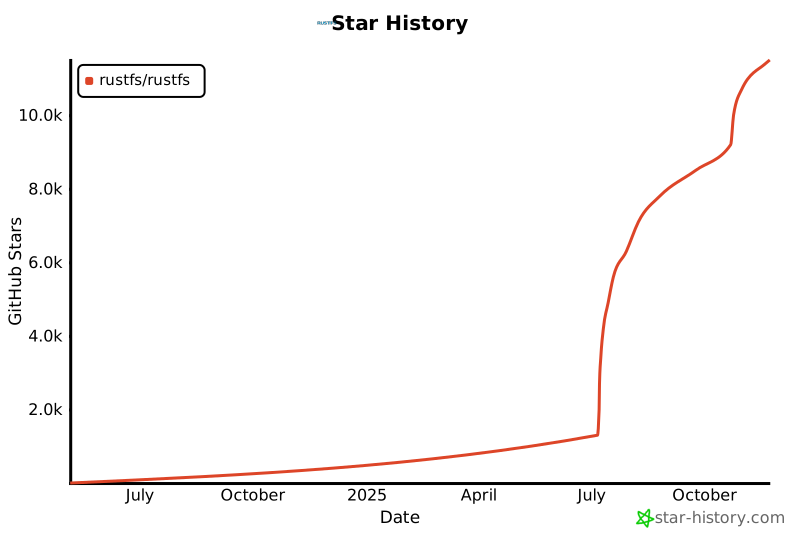](https://www.star-history.com/#rustfs/rustfs&type=date&legend=top-left)
|
||
|
||
## 许可证
|
||
|
||
[Apache 2.0](https://opensource.org/licenses/Apache-2.0)
|
||
|
||
**RustFS** 是 RustFS, Inc. 的商标。所有其他商标均为其各自所有者的财产。
|